 Manga Vault


Scan the ISBN barcode on your manga.
Manga Vault uses your phone's camera to read the ISBN barcode on the back of a volume. No typing, no searching: point and add.
-
Matched to the exact edition
Every scan is looked up in our own catalog of 90,000+ volumes in 8 languages, so you get the right volume and edition, not a guess.
-
Quick Scan modePRO
Scan a whole stack: each book is added as you go, with an Undo button, and no confirmation in between.
-
Auto-fills the details
Fills in the title, volume, author, cover, edition, publisher, page count and release date from our catalog.
-
Duplicate alerts
Scanning a volume you already own? You see "Already in Collection" before you buy it again.
Which barcode?
Aim at the long barcode.
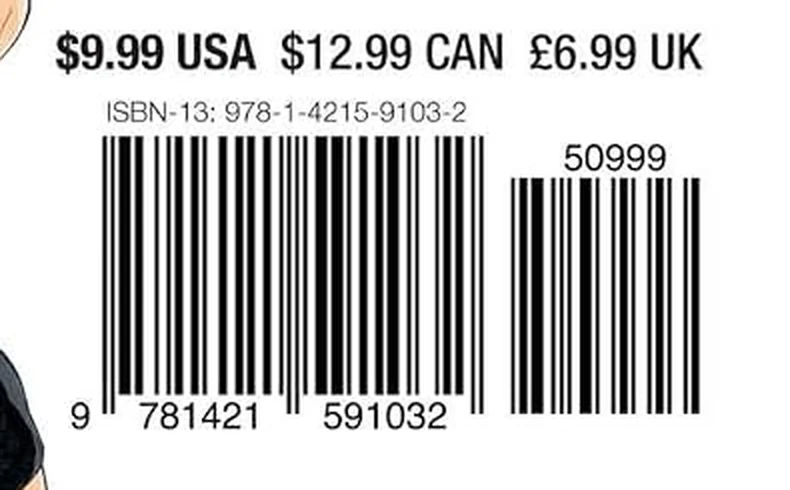
The long barcode is the ISBN. It starts with 978 or 979 and names this exact book: this one is Haikyu!! Vol. 13 from VIZ Media.
The short one beside it is a price code. Phone cameras don't read it, and Manga Vault doesn't need it.
Imported Japanese volumes print two barcodes, one above the other. Scan the top one (978…). The bottom one (191… or 192…) is a price and category code.
How the scanner works.
- Step 1
Open the scanner.
Tap the scan button in Manga Vault to activate your camera. No setup, no permissions wizards beyond the one-time camera grant.
- Step 2
Point at the barcode.
Aim at the ISBN barcode on the back of the volume and keep it inside the frame.
- Step 3
Add it.
Manga Vault shows the volume it found, with its cover, volume number, publisher and price. Tap Add to Collection, or turn on Quick Scan (PRO) to add each book automatically. If you already own it, you see "Already in Collection" instead.
Free on iPhone and Android
Your whole shelf, one scan at a time.
Point your phone at the barcode on the back of a volume. Manga Vault finds it in a catalog of 90,000+ volumes in 8 languages.